Waterless Cold Air Technology

TX500

A waterless cold-air diffuser engineered for large spaces — hotel-lobby coverage, an LCD scheduler with six working programs, and full remote control from the Scent Space Pro app.
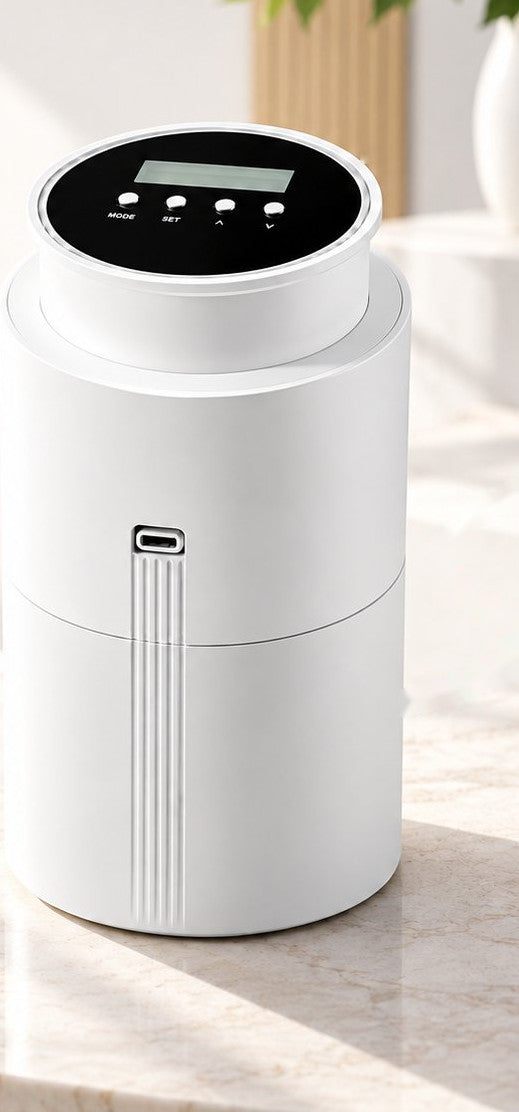
400 ml bottle 800–1000 m³ / 10,000 sq ft DC 12V / 8W LCD & 6 programs Scent Space Pro app Desktop · Wall · Ceiling
WSNUEEE TX500 waterless cold air aroma diffuser in white with its LCD control panel
Model TX500 · Waterless Cold Air Technology · Product Manual
Home › Guides › TX500 Setup Guide
·9 min read·Reviewed by WSNUEEE Product Support·Model TX500
Technical Specs

Know Your TX500

Everything you need to know about your TX500 before the first use.

MODELTX500
POWERDC 12V / 8W
CAPACITY400 ml bottle
COVERAGE800–1000 m³10,000 sq ft
SIZE110 × 110 × 200 mm4.3 × 4.3 × 7.9 in
WEIGHT~1 kg2.2 lb
Ideal For
Hotel Lobby
Restaurant
Retail
Office
Home
Built for Large Spaces
The TX500 uses waterless cold-air atomization — no heat, no water, no dilution. A single unit scents 800–1000 m³ (up to 10,000 sq ft), making it a natural fit for lobbies, showrooms and open-plan interiors. Run it on the DC 12V adapter and mount it on a desk, a wall or suspended from the ceiling.
Quick Start

Get Started in 6 Easy Steps

From unboxing to your first scent — under five minutes.

Open the machine
01

Open the machine.

Take off the oil bottle
02

Take off the oil bottle.

Pour in your favorite essential oils
03

Pour in your favorite essential oils.

Put the oil bottle back and close the machine
04

Put the oil bottle back and close the machine.

Plug the power cord and connect to the power supply
05

Plug the power cord and connect the machine to the power supply.

Operate the machine manually or with the smart app
06

Operate the machine manually or with the smart app. Enjoy the fragrance.

Before You Start
Use 100% pure essential oil only. Never mix with water, perfume bases or synthetic fragrances, and do not overfill the 400 ml bottle.
Installation Options

Desktop, Wall or Ceiling

Three mounting options — pick the one that fits the space.

1

Plug it in — set the unit upright on a flat, stable surface and connect the DC 12V adapter.

2

Enjoy the fragrance — the diffuser auto-starts on power-up and begins atomizing.

TX500 installation options: desktop use, wall-mounted use and ceiling-suspended use with the supplied bracket and screws
Installation options ① Desktop   ② Wall-Mounted   ③ Ceiling-Suspended
Ventilation matters. Keep the area around the mist outlet clear, and never block the outlet while the unit is running.
Controls

LCD & Button Guide

Everything the screen shows, and what each of the four buttons does.

TX500 LCD screen showing weekday, work and pause status, time, Bluetooth and battery indicators, with MODE, SET, UP and DOWN buttons
The LCD shows weekday, work/pause status, time, Bluetooth, fan and battery level.
What the Screen Shows

1. Turn on — the machine auto-starts after power on.

2. Standby display — current weekday, time, work information, battery level and Bluetooth connection status.

3. Local time setting — long-press the SET button for 5 seconds to start. Press ▲ / ▼ to set the hour, press SET to confirm, then set the minute and confirm, then select the weekday and confirm. The system saves the setting automatically.

The Four Buttons
M
MODESwitch between the 6 working programs. Hold 5 s to reset.
S
SETEnter / confirm time & settings.
▲
UPAdjust values. Fan Off / 1 / 2.
▼
DOWNAdjust values. Triggers a 5-second spray test.
Programming

Six Working Programs

Each program controls one part of the daily scent cycle. Tap a program to see how it behaves.

P1
Work Time — On-1Daily on-time period 1
Schedule
P2
Pause Time — Off-1Daily off-time period 1
Schedule
P3
Scent IntensityWork seconds per cycle
10–300 s
P4
Pause IntervalRest seconds per cycle
10–900 s
P5
Work Time — On-2Daily on-time period 2
Schedule
P6
Pause Time — Off-2Daily off-time period 2
Schedule
Factory default: 08:00–22:00 daily · 60–120 s frequency · hold MODE for 5 s to reset.
Mobile App

Scent Space Pro

Unlock full remote control and scheduling from your phone.

Scent Space Pro app icon

Download Scent Space Pro to unlock full remote control and scheduling features — set working periods, switch modes and check status without touching the unit.

App Store Google Play Android APK
QR code to download the Scent Space Pro app
Scan to Download

Search “Scent Space Pro” in your app store, or scan the QR code to download instantly.

Compatible with iOS 11+ & Android 7.0+.

How to Install the App
1

Open the App Store, Google Play or the Android app store and search for “Scent Space Pro”.

2

Install the app, then scan the QR code above if you prefer a direct link.

3

Open the app and continue to Bluetooth pairing to connect your TX500.

Connectivity

Bluetooth Pairing

Three steps to connect the TX500 to your phone.

1

Enable Bluetooth on your smartphone.

2

Open Scent Space Pro → tap Bluetooth Mode → tap My Devices.

3

Select SPACE-BLE-B or SPACE-BLEWIFI-B → enter the password 9999 → Confirm.

Select Network Mode or Bluetooth Mode in the app Choose the SPACE-BLEWIFI-B device from the list Enter the default pairing password 9999 and confirm
⚠ Keep Phone Near Device
Keep your phone within 3 m of the diffuser during initial pairing. The default password is 9999 — change it later from the app.
App Functions

Control from Your Phone

Check working and pause time, change settings, and turn the device on or off — all from the app.

Scent Space Pro device settings screen annotated with Scent Test, Rename Device, Device Switch, Child Lock, Change Password, Fan Mode, Add Working Mode and Collection Mode
Device settings screen — tap any mode to edit the working mode.
①Scent Test

5-second quick spray test.

②Rename Device

Custom device names.

③Fan Mode

Control fan speed / gear.

④Child Lock

Safety panel lock.

⑤Change Password

Update BT security code.

⑥Working Modes

Add, switch & manage.

Smart Features

Scheduling & Favorites

Set a weekly schedule once, then save and reuse it across devices.

Work Schedule

Work schedule screen showing period time, weekday selection and frequency
  • Up to 5 daily periods
  • Mon – Sun selection
  • Custom work / pause seconds

Favorites

Favorites screen for saving and applying collection modes across devices
  • Save favorite modes
  • Apply to other devices
  • Sync multi-diffuser
Important

Safety Warnings

Please read the following before using your TX500.

Prohibitions

No unsafe plugs. Keep away from children. Do not use flammable, explosive or corrosive solvents — pure essential oils only.

Fire & Heat

Keep away from open flame, heat sources, high-temperature environments, and areas with high humidity.

Installation

Ensure secure mounting. Maintain ventilation around the device. Never block the mist outlet during operation.

Liquids

Use only 100% pure essential oils. Do not mix with water, perfume bases or synthetic fragrances. Do not overfill the bottle.

Always unplug before cleaning or performing maintenance.
Help

Troubleshooting

Most issues trace back to power, the atomizing nozzle, or the oil itself.

No Atomization

CheckPower connection, pump operation, nozzle for blockage, and oil level in the bottle. Ensure the power adapter is firmly connected and the outlet is working.

Low / Weak Atomization

FixClean the nozzle with alcohol. Check the sealing pad for wear. Reattach the air line to ensure a tight connection. Low oil levels may also cause weaker mist output.

Liquid Rejection (Spitting)

FixPlace the diffuser on a completely flat, level surface. Tilting causes uneven oil flow and liquid rejection from the nozzle.

Oil Leakage

FixTighten the oil bottle cap securely. Inspect and replace damaged packing pads or seals. Do not overfill the bottle beyond the 400 ml capacity.

Abnormal Noise

FixRe-install the air pump to ensure proper seating. Clear any blockage in the mist outlet. Persistent noise may indicate a faulty pump — contact support.

For further assistance, contact WSNUEEE customer support through the app or our website.
Care

Maintenance & Cleaning

Five habits that keep mist output strong and scent true.

Clean Every 2–3 Months

Regular cleaning ensures optimal performance. Use a small amount of alcohol on a soft cloth to clean the nozzle and internal components.

Clean When Switching Oils

Always clean the nozzle and bottle when switching to a different essential oil to prevent scent mixing and nozzle clogging.

Clean When Mist Weakens

If you notice the mist becoming thinner or less consistent, it’s time to clean the atomizing nozzle and air pathway.

Check & Replace Sealing Pads

Inspect the sealing pads and gaskets regularly. Replace them if they show signs of wear, cracking or deformation to prevent leaks.

Always Unplug Before Cleaning

Disconnect the power adapter before any cleaning or maintenance. Use only a dry or slightly damp soft cloth — never submerge in water.

After-Sales

Warranty & Support

Covered for a full year from the date of purchase.

12
MONTHS WARRANTY
  • ✓Free repair or replacement for manufacturing defects.
  • ✓Free technical support and installation guidance.
  • ✗Excludes human error, incorrect operation, or unauthorized repairs.
Customer Support
Email wsnueee@outlook.com · WhatsApp +852 64867199 · wsnueee.com/support. Our team replies within 24 hours.
Questions

Frequently Asked Questions

Quick answers to the things TX500 owners ask most.

What is the WSNUEEE TX500?
The TX500 is a waterless cold-air aroma diffuser with LCD scheduling, six working programs and Scent Space Pro app control. It holds a 400 ml bottle, runs on DC 12V / 8W, and covers 800–1000 m³ (up to 10,000 sq ft).
How do I set up the TX500 in six steps?
Open the machine, take off the oil bottle, pour in your essential oil, put the bottle back and close the machine, plug in the power cord, then operate the machine manually or with the smart app and enjoy the fragrance.
What are the installation options?
Three ways. Desktop: plug it in and enjoy. Wall-mounted: stick the backplate to the wall, hang the machine on the back plate, then enjoy. Ceiling-suspended: secure the fitting with 4 screws, install the machine and plug it in.
How do I set the clock on the TX500?
Long-press the SET button for 5 seconds. Use ▲ / ▼ to set the hour and press SET to confirm, then set the minute and confirm, then select the weekday and confirm. The system saves the setting automatically.
What do the four buttons do?
MODE switches between the six programs (hold 5 s to reset). SET enters and confirms time and settings. UP adjusts values and the fan (Off / 1 / 2). DOWN adjusts values and triggers a 5-second spray test.
What are the six working programs?
P1 Work Time On-1 and P2 Pause Time Off-1 are the first daily on/off window. P3 sets scent intensity (10–300 s work per cycle) and P4 sets the pause interval (10–900 s rest). P5 and P6 add a second daily on/off window. Factory default is 08:00–22:00 at 60–120 s frequency.
Which app does the TX500 use and what is the password?
Scent Space Pro, compatible with iOS 11+ and Android 7.0+. Enable Bluetooth, open the app, tap Bluetooth Mode then My Devices, select SPACE-BLE-B or SPACE-BLEWIFI-B and enter the default password 9999. Keep your phone within 3 m during pairing.
Which oils can I use in the TX500?
Use 100% pure essential oils only. Do not mix with water, perfume bases or synthetic fragrances, and do not overfill the 400 ml bottle.
What should I do if there is no mist or weak mist?
Check the power connection, pump operation, nozzle for blockage and the oil level. Clean the nozzle with alcohol, check the sealing pad for wear, and reattach the air line to ensure a tight connection.
How often should I clean the TX500?
Every 2–3 months, whenever you switch to a different essential oil, or when mist output weakens. Always unplug first, and use a small amount of alcohol on a soft cloth. Replace sealing pads if they show wear or cracking.
About WSNUEEE

Where Technology Meets Scent.
Where Space Becomes Art.

We design scent as architecture — engineered for the air you live in, and for spaces that deserve to be felt, not just seen.

Need help with setup, ordering, or a warranty claim? Our team replies within 24 hours.

WOSUO INTERNATIONAL LIMITED
Unit 11, 9/F, The Cloud, No. 111 Tung Chau Street, Tai Kok Tsui, Kowloon, Hong Kong
Follow@wsnueee
Universal Villa 2000 Sq.Ft
Ready to scent your space?

Universal Villa 2000 Sq.Ft

$59.00

A 400 mL machine at DC 12 V / 8 W, built for shops, lobbies and hospitality spaces rather than a bedside table.

View product details
  • Free shipping
  • 12-month warranty
  • Ships in 1–2 business days
© 2026 WSNUEEE · Model TX500 · Waterless Cold Air Technology · Made in China SAVE THESE INSTRUCTIONS